
to get a personalized navigation.
to get a personalized navigation.

- Mark Topic as New
- Mark Topic as Read
- Float this Topic for Current User
- Bookmark
- Subscribe
- Mute
- Printer Friendly Page

Inventory endpoint, getting spaces in warehouseID
Hi,
We have discovered that warehouseDetails on Inventory endpoint returning the warehouseId with ending spaces in some clients,
Testing with "/controller/api/v1/inventory/{inventoryNumber}" returning no spaces:
under /controller/api/v1/inventory returning this on the same item:
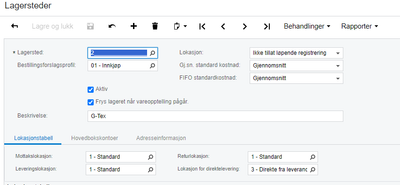
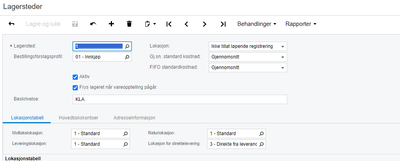
In UI there are no spaces on the warehouse.
Belive this is a bug?

.gif "VISMA")
Hei Steinar, I've managed to reproduce the trailing space issue. It appears to be happening with the newly created Warehouses, perhaps something change between the versions. Unfortunately, I don't have information about the exact version / date. However, this has now been reported to the team.
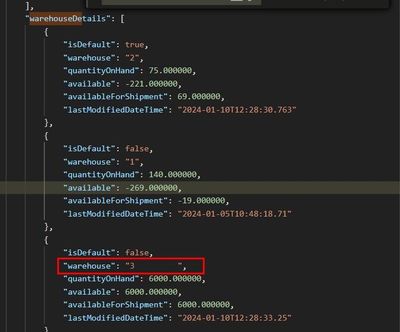
Hi Steinar,
I've checked the scenario, and Warehouse IDs listed under the warehouseDetails don't have any trailing spaces in my company.
GET: https://integration.visma.net/API/controller/api/v1/inventory?expandWarehouseDetail=true
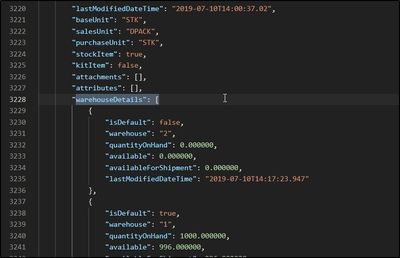
Could you share your transaction details and printscreen from the UI showing the field ?
Hi Yildrim,
Sorry for late reply
In UI for warehouse = 2
And this for Warehouse=1
Getting this in API
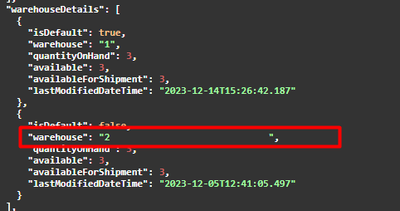
As you can see warehouse 1 is without spaces and warehouse 2 getting ending spaces. In UI the set up is the same.
Steinar
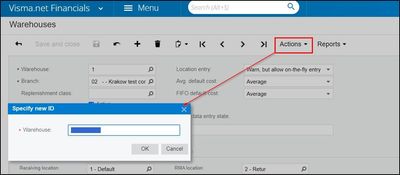
Getting this
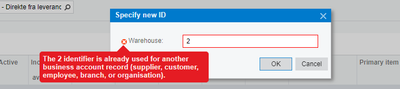
I have also tested with a demo client and getting the same resultat in API with ending spaces for Warehouse 2.
I have tryed that now, first changed to 3 and back to 2, but getting the same problem with ending spaces.
I am not sure about how it is created, I think it just created as normally, and as we can see, the same issue is on other clients as well.
As mentioned above the problem is on /controller/api/v1/inventory, when using this /controller/api/v1/inventory/{inventoryNumber} there are no ending spaces.
Useful pages
Contact us
Copyright © 2022 Visma.com. All rights reserved.
 Visma Finland
 Visma Latvia
 Visma Netherlands
 Visma Norway
 Visma Sweden
 Visma Developers & Partners
 Visma Latin America